




1. Add public docs and test real questions
Free is permanent: one site, up to 10 pages, and 100 messages per month with no credit card. Check the answers and sources, then embed the widget when you are ready.
Start with your public docs, test real technical questions, and check the linked sources before you add the widget to your site.
Free is permanent: one site, up to 10 pages, and 100 messages per month with no credit card. Check the answers and sources, then embed the widget when you are ready.
General-purpose AI chatbots try to be conversationalists. Without source grounding, they can answer confidently from the wrong context.
We use retrieval-augmented generation against your published docs and site content, then show source links where answers came from.
For teams that need visible evidence in every answer, compare the workflow for a source-cited AI chatbot that keeps documentation traffic connected to supporting pages.
Use questions your support and community channels already see. Check each answer and its linked source page before publishing the widget.
“How do I get started, authenticate, and make my first request?”
“What does this error mean, and where is the fix documented?”
“What are the plan limits, rate limits, and pricing for this feature?”
“Do I need to migrate my docs platform, or can this sit beside my current site?”
Use the chatbot to help developers find endpoints, authentication steps, parameters, SDK methods, and known errors, then return to the reference for full context. A plausible code example or a visible citation is not proof of correct API behavior.
Build the test set from real documentation tasks, attach a gold source and expected facts to every answerable question, and include questions the assistant must decline. Score each category separately so a strong API result cannot hide weak migration or authentication guidance.
Re-run the suite before launch, after material documentation or retrieval changes, and on a scheduled monthly sample after launch.
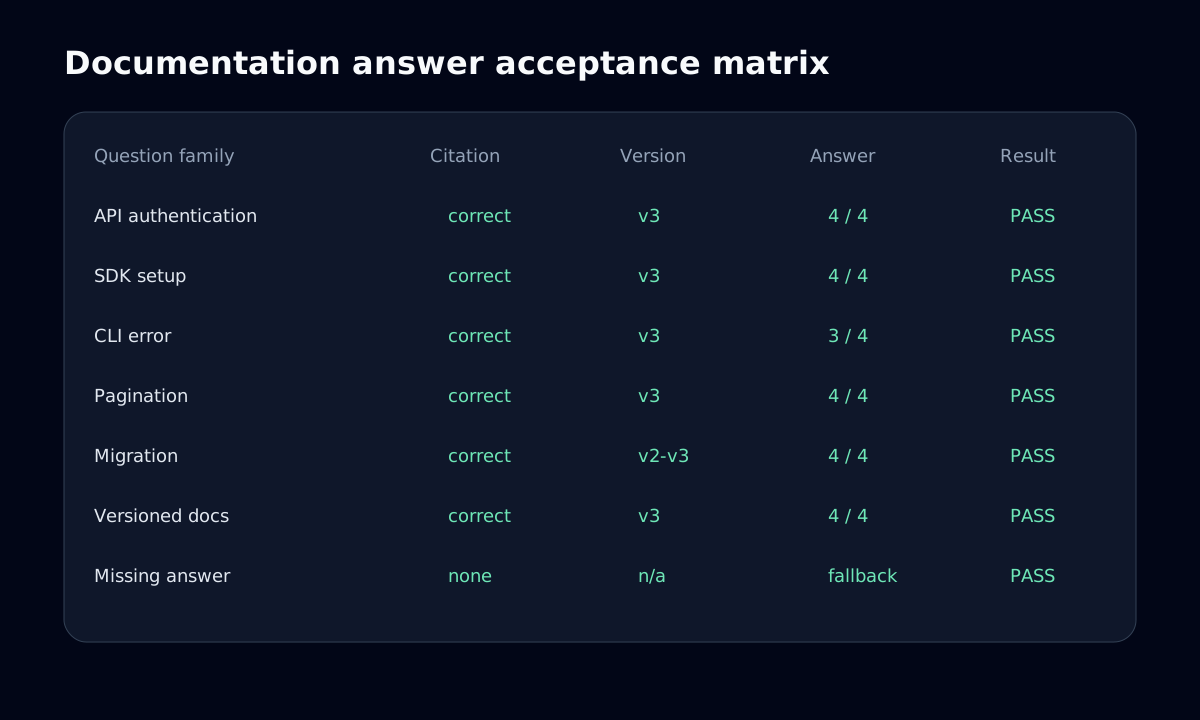
| Question area | Test fixture | Pass condition |
|---|---|---|
Question area API | Test fixture Endpoint, required fields, response shape, and rate limit. | Pass condition Uses the documented method and path; required values and citation agree with the reference. |
Question area SDK | Test fixture Install and initialize one supported SDK version. | Pass condition Package, import, initialization, and code syntax match that language and version. |
Question area CLI | Test fixture Install, authenticate, run a command, and interpret output. | Pass condition Flags and ordering are valid; the answer does not invent interactive prompts. |
Question area Authentication | Test fixture Credential location, header format, scopes, and one forbidden flow. | Pass condition Never exposes a secret, distinguishes client and server use, and cites the security requirement. |
Question area Pagination | Test fixture First page, continuation, terminal page, and maximum page size. | Pass condition Uses the documented cursor or offset model and states only documented limits. |
Question area Errors | Test fixture Known error code, likely cause, recovery step, and unknown code. | Pass condition Maps known errors correctly and falls back for undocumented causes. |
Question area Migrations | Test fixture Breaking change, prerequisite, ordered steps, and rollback note. | Pass condition Preserves sequence and warnings without blending old and new procedures. |
Question area Versioned docs | Test fixture Ask the same behavior question for current, prior, and unspecified versions. | Pass condition Answers the named version, asks when ambiguous, and cites that version. |
Publish the rules before testing. Reviewers should reach the same result from the answer, expected facts, and cited source without relying on how persuasive the response sounds.
| Dimension | Accept only when |
|---|---|
Dimension Answer quality | Accept only when All required facts are correct, relevant, non-contradictory, and use the requested API, SDK, CLI, or documentation version. |
Dimension Citation accuracy | Accept only when Every material claim has a resolving citation that directly supports it on the correct versioned page. |
Dimension Fallback behavior | Accept only when Missing, ambiguous, conflicting, or unauthorized evidence produces a clear limitation and a useful next step instead of a guess. |
Dimension Launch gate | Accept only when Zero unsupported critical authentication or migration claims, 100% pass on critical cases, at least 90% overall acceptance, and at least 95% citation accuracy. |
Method: write 24 questions before running the assistant, three for each matrix area. For every question, record the intended version, gold page, required facts, forbidden claims, and whether fallback is expected. Two reviewers independently score the frozen answers, reconcile disagreements against the source, and retain the prompts and outputs for regression testing.
Every figure below is a hypothetical example for a 24-question fixture, not a measured ChattyBox result, production average, or promise of future performance.
| Example result, not measured | How to use the example |
|---|---|
Example result, not measured Example: 22 of 24 accepted (91.7%) | How to use the example Example interpretation: 20 supported answers and two correct fallbacks. |
Example result, not measured Example: 20 of 22 substantive answers cited directly supporting pages (90.9%) | How to use the example Example interpretation: below the 95% launch gate, so version ranking needs correction. |
Example result, not measured Example: 2 of 2 expected fallbacks were correct (100%) | How to use the example Example interpretation: no answerable case incorrectly fell back in this small fixture. |
Example result, not measured Example: 1 of 24 contained an unsupported pagination detail (4.2%) | How to use the example Example interpretation: block launch until the unsupported claim is removed and the regression passes. |
Purpose-built workflows that keep answers traceable, grounded, and useful for technical users.
Enter your docs, website, or sitemap URL. ChattyBox crawls and indexes the pages users already read.
The answer flow is configured to use retrieved context and avoid unsupported API, feature, pricing, or policy claims.
Answers can include links back to the documentation pages where the relevant information lives.
Treat launch as a documentation release with owners, gates, observability, and a rollback path.
Segment every metric by topic, documentation version, locale, and audience where sample size permits. Trends and reviewed samples are more useful than one aggregate score.
| Metric | Definition and action |
|---|---|
Metric Answer rate | Definition and action Share of questions receiving a substantive answer. Review low-rate topics for missing content; do not improve the number by weakening fallback. |
Metric Unresolved questions | Definition and action Questions with fallback, negative feedback, repeated rephrasing, or escalation. Sample them weekly for answer and retrieval defects. |
Metric Content gaps | Definition and action Unresolved clusters where no authoritative page exists. Route these to the docs backlog with frequency and user impact. |
Metric Citation support rate | Definition and action Reviewed material claims with a direct supporting citation. Investigate drops by source and version. |
Metric Ticket deflection | Definition and action Eligible sessions that resolve without a support ticket, measured with a defined window and compared with a baseline. Report association unless an experiment establishes causality. |
Use the RAG architecture and evaluation guide to diagnose retrieval, the citation workflow to review evidence, the API documentation checks for engineering-specific use cases, and the technical launch checklist for deployment steps.
These answers summarize how ChattyBox reads source content, cites documentation pages, handles missing information, and installs alongside an existing docs stack.
Yes, when endpoint references, parameters, authentication guides, SDK examples, and error details are present in indexed public content. It does not execute API calls or inspect private accounts. Retrieved context and citations do not eliminate invented API behavior; test important claims against the reference.
No. Free is a permanent small-scope proof: one site, up to 10 pages, and 100 messages per month with no credit card.
Start with the public pages that answer common setup, troubleshooting, pricing, and product questions. You can expand the source set after you have checked the first answers.
Add more pages when the first test set is useful and the supporting sources are current. Keep private, outdated, and unrelated pages out of the chatbot.
Yes. Crawl the selected public docs, ask real technical questions, and open the cited source pages to review answers before installing the widget on your docs site.
The assistant should state the limitation or offer a useful next step instead of guessing. Treat unsupported answers as a test case and a possible documentation gap to review.
Start with the permanent Free proof for selected public pages, test technical questions, and inspect sources before embedding the widget.
We use optional analytics and tag-management tools to understand site use. Choose whether to allow Ahrefs Web Analytics, PostHog, and Google Tag Manager. Turning analytics off reloads this page so the change takes effect cleanly. Essential site functionality and error monitoring are not controlled by this choice. Read our privacy policy.